Cleared Table
Coming soon to the App StoreThe food app for households that can't afford food mistakes
Allergies, celiac and elimination protocols turn every dinner into a background check. Cleared Table does the checking first: everything you see in the app has already been checked against your household's restrictions, so browsing feels like abundance instead of vigilance.
- Built by a gluten-free household in Wilmington, NC
- Lite is free, no card
- Full is $7.99 a month, 3 days free first
The iPhone app
Coming soon to the App Store
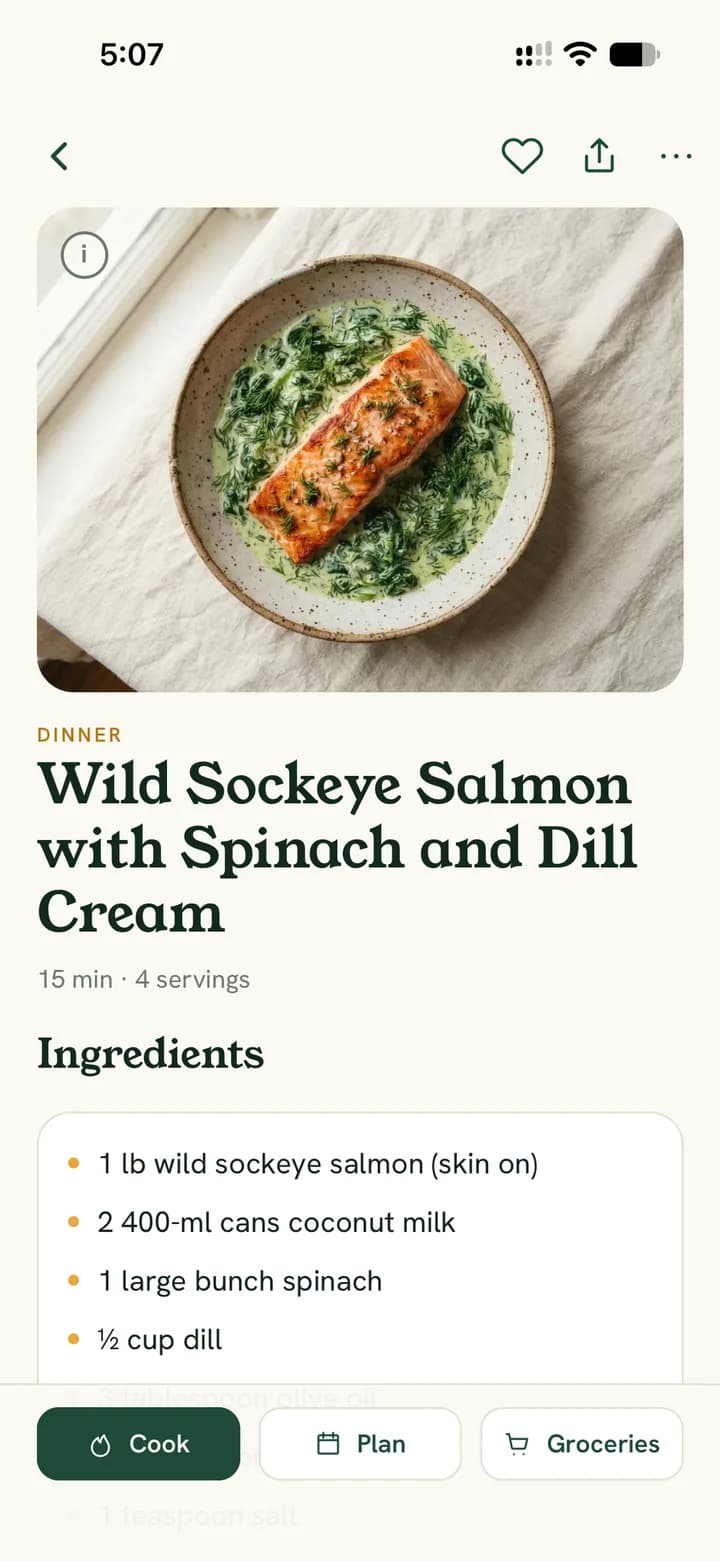
The Cleared Table app for iPhone is in its last round of testing. The barcode scanner on its own tab and Search at the top of every screen are already in it. Until it lands, the website works on your phone today: sign in, add it to your home screen, and it opens full screen from its own icon.
How it works
Three steps, then dinner stops being a background check
- 1
Tell it your restrictions
Set your table's allergies, intolerances and things to avoid, tiered by how serious they are. Allergy-tier restrictions are locked: nothing in the app can override them.
- 2
Tell it what's in the kitchen
Keep a simple pantry list. The app matches it against every cleared recipe and ranks dinners by how much you already have in the house.
- 3
Cook what's cleared tonight
Pick tonight's dinner, generate the whole week in one tap, or let the table vote on the website. Everything you can see has already been checked against your household's restrictions. The label is always the final word.
Free to start. Set your table in two minutes.
Who it's for
Built for the kitchens where the ingredient list matters most
Celiac and gluten-free households
Wheat, barley and rye are checked at the ingredient level, and cross-contact gets its own warning instead of hiding inside the ingredient list.
Food allergies
Peanut, tree nut, shellfish, dairy, egg, soy, sesame, fish and wheat, each set for your table at the allergy tier that can never be overridden.
Autoimmune and elimination protocols
AIP and nightshade-free kitchens. Set the protocol once and the recipe generator only works from ingredients cleared for it.
Mixed tables
One person restricted, everyone eats the same dinner. The household's restrictions combine, so one recipe list works for the whole table.
Free to start. No card needed.
Every screen
The whole table, one screen at a time
Every phone below is the Cleared Table app for iPhone, the same one coming to the App Store. Lite covers the allergen engine, the recipe library, the pantry, the scanner and a week you build by hand. Full opens the rest.
Week
One cleared dinner a night, chosen together
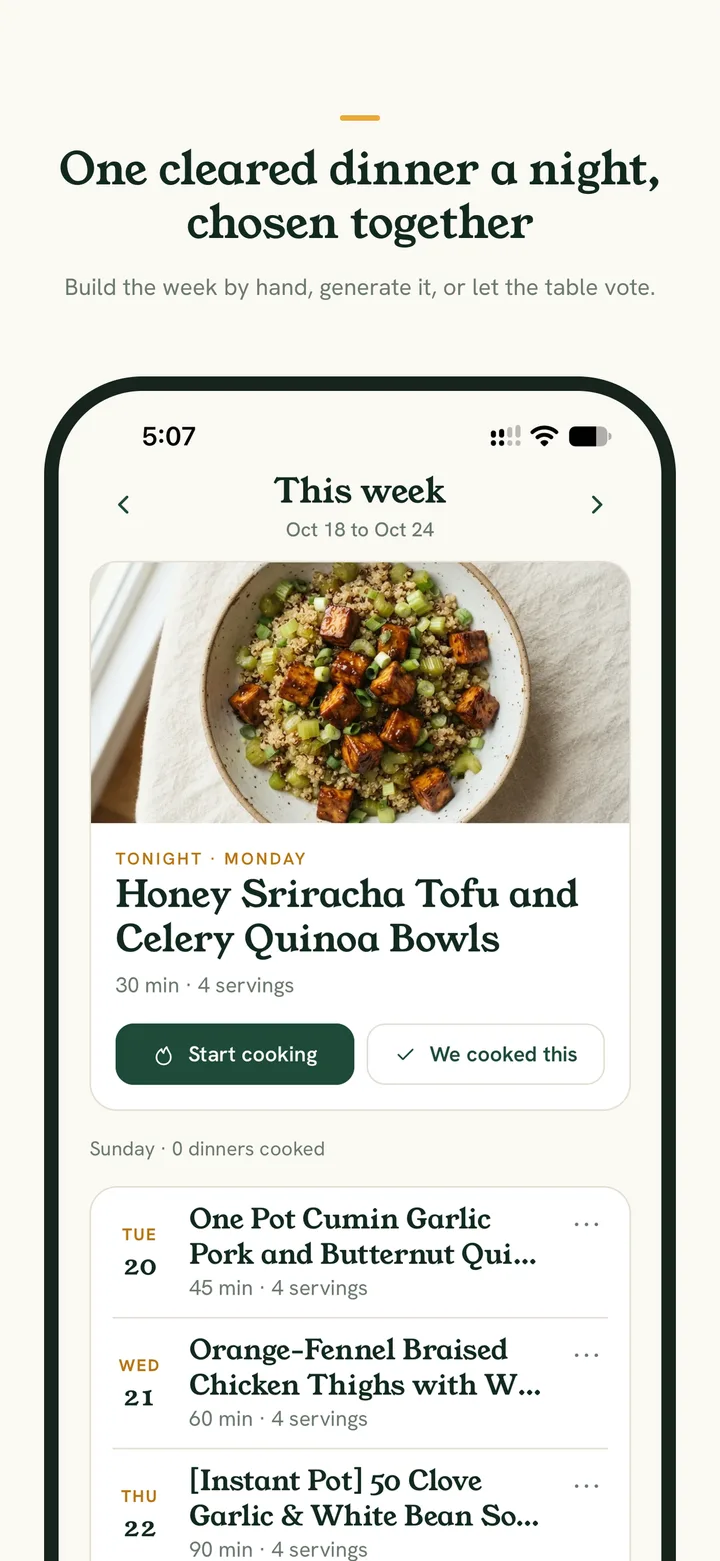
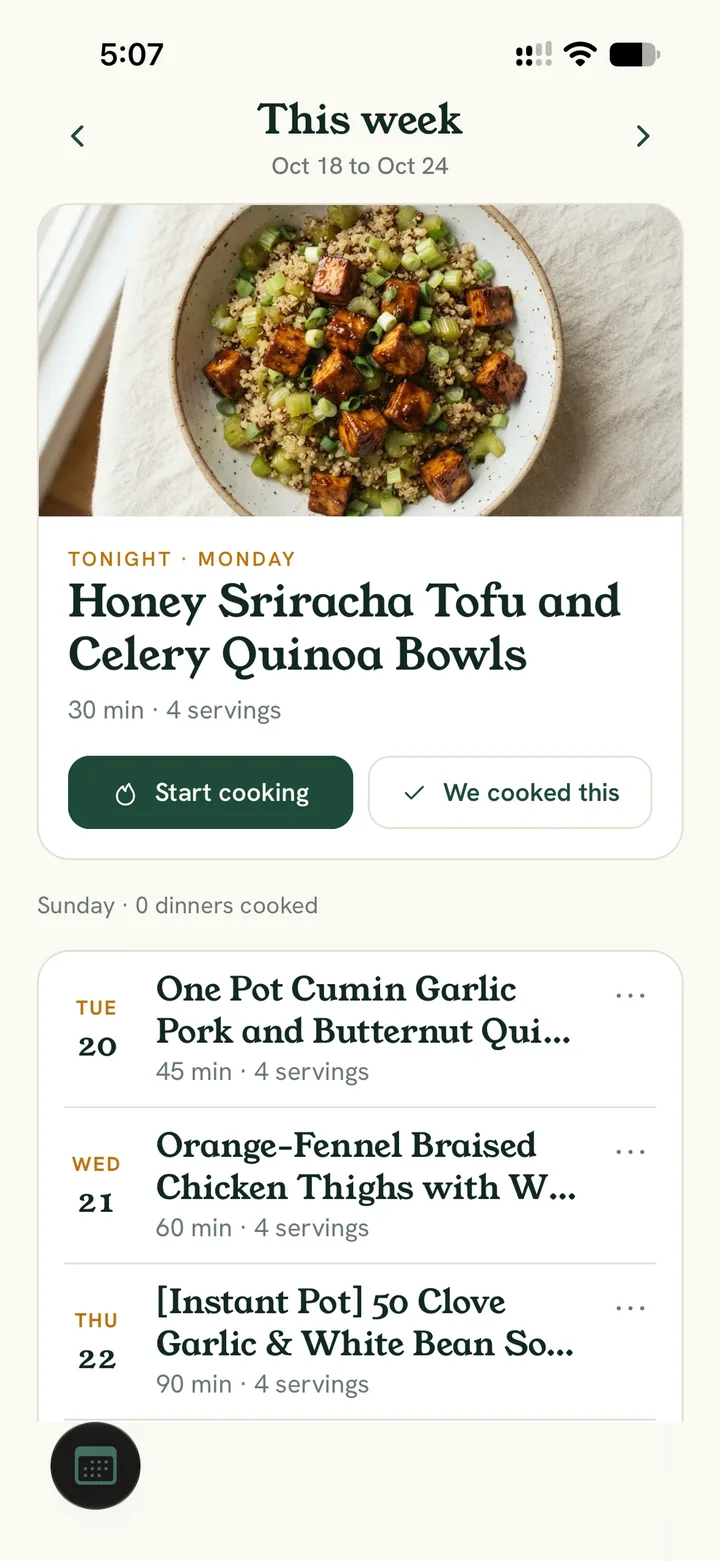
The Week tab is the home screen: tonight's dinner on top, the rest of the week under it. Generate my week fills Sunday to Saturday from your cleared list in one tap, or you build the week by hand. On the website the table can also vote when nothing is planned yet. Streaks and the Table-tested seal keep track of what actually worked.
- Generate my week fills every open night, never repeats a primary protein on consecutive days, and can start the week over whenever you like.
- Household voting on the website: one vote each from the cleared list, and the leader can be locked straight onto tonight's plan.
- Start cooking opens the recipe step by step. We cooked this counts the dinner toward the household's streak, and a recipe that survived your real table earns the Table-tested seal.
Recipes and the allergen engine
Cleared, or invisible
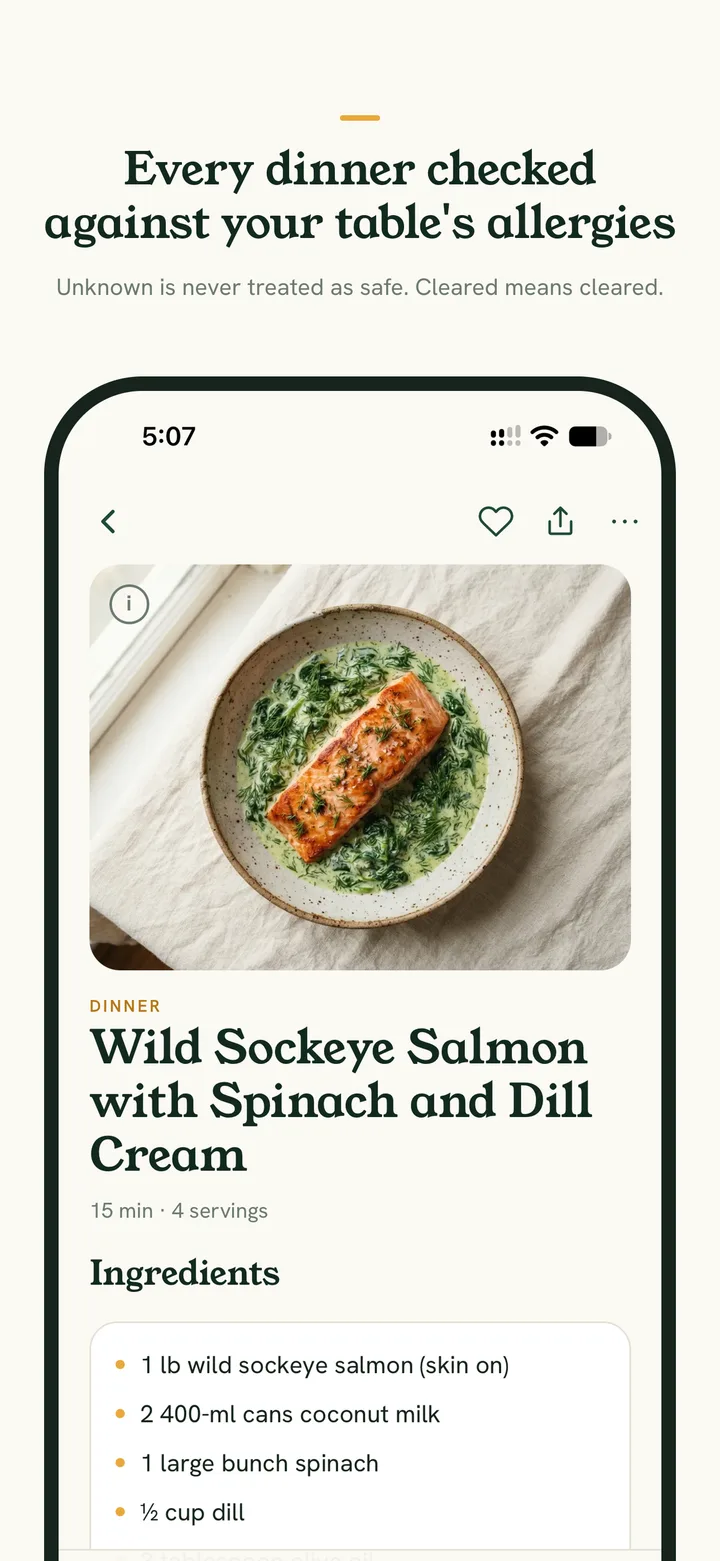
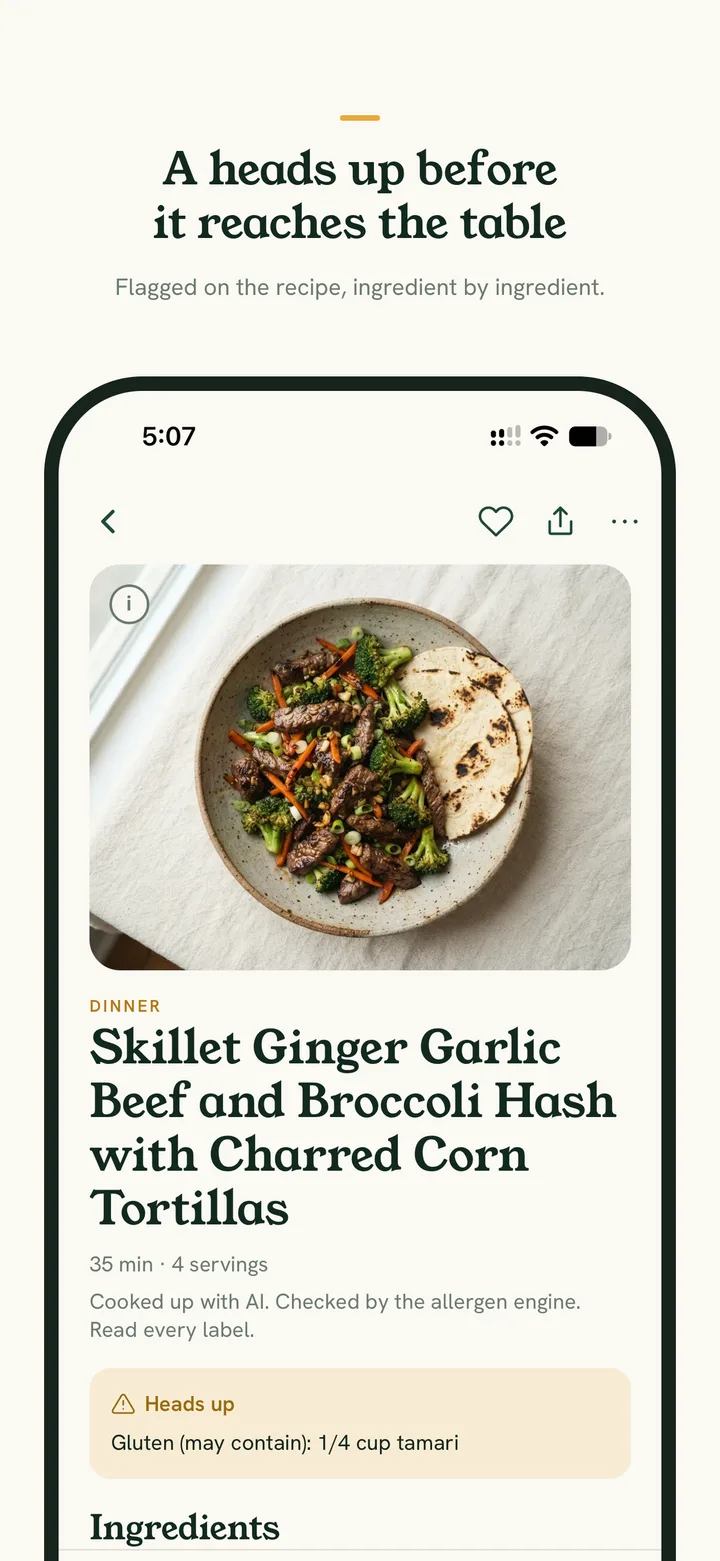
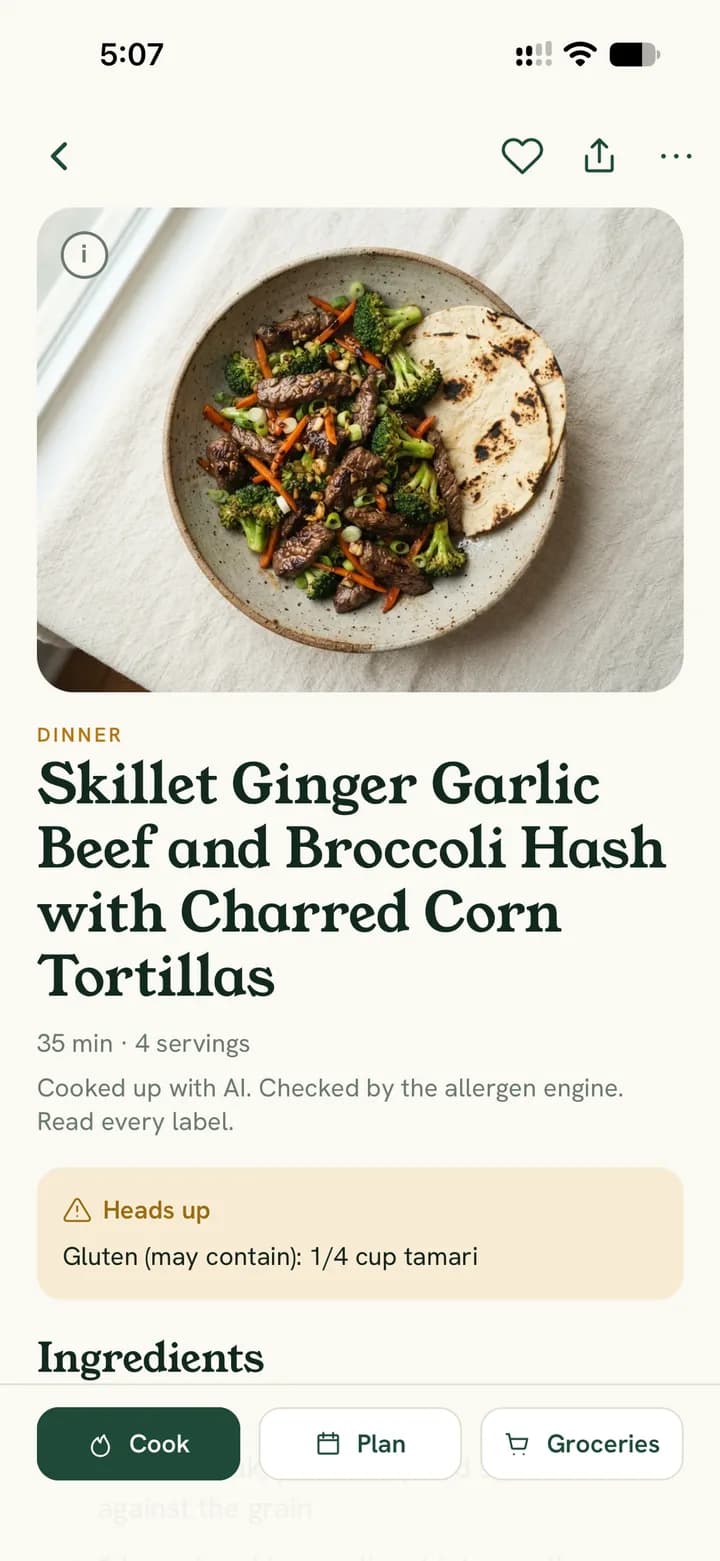
A deny-by-default engine checks every ingredient of every recipe against your household's restrictions before anything reaches the screen. Anything it cannot identify is treated as not cleared. Every recipe is re-checked for each household, so a dish another table saved is checked fresh against yours.
- A recipe that fails the check never shows up. There is no red list to scroll past, just the cleared ring on everything you see.
- Cross-contact is tracked separately and shown as its own heads up on the recipe, ingredient by ingredient, never folded into the ingredient check.
- Recipes come from three places: Cook Up originals your table makes, the Commons of original dishes from other tables, and recipes you clip from other websites, which stay private to your household.
- Share any cleared recipe as a link with a story card for the share sheet. The page shows the dish and what it is free of, never your household. Stop sharing and the link closes.
Restrictions
Tell it once what you are guarding
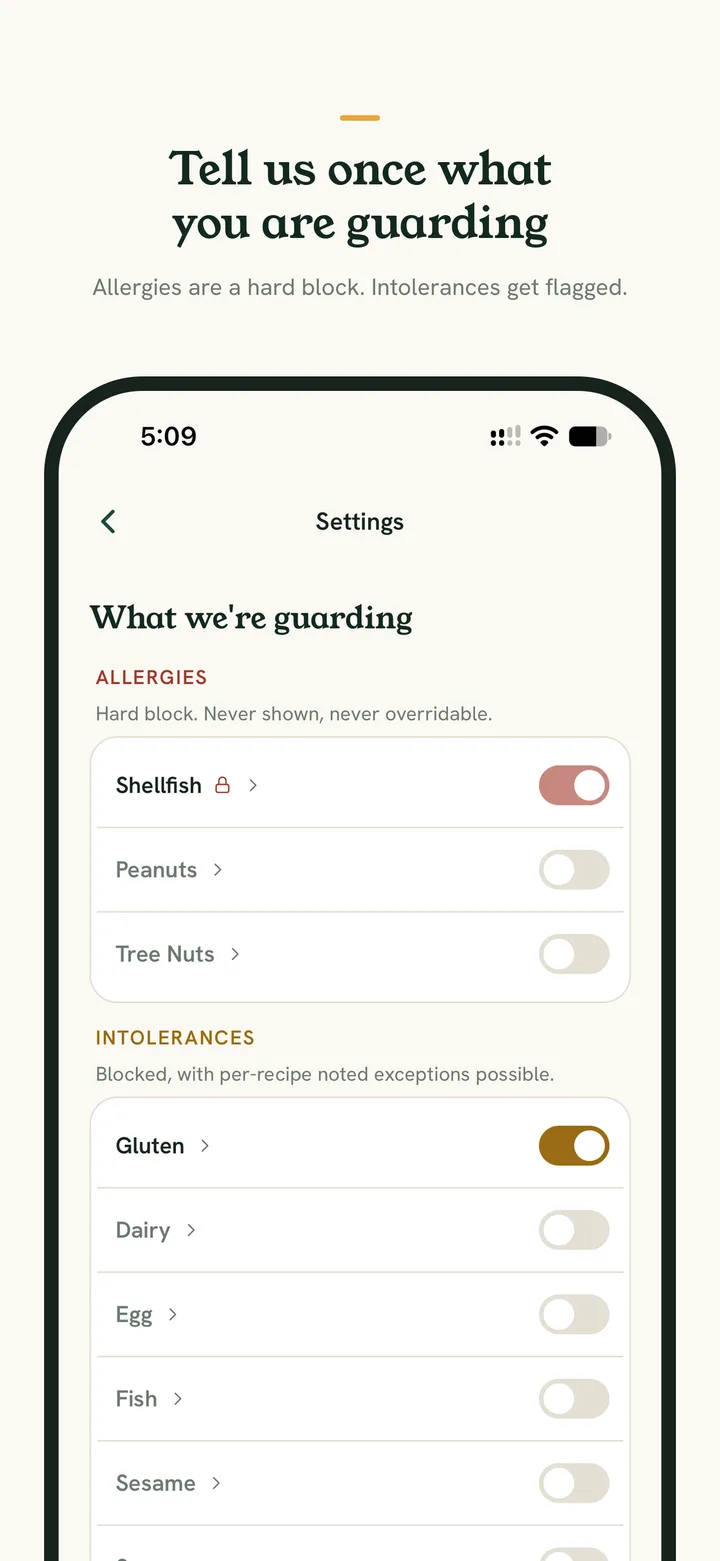
Set the table's allergies, intolerances and things to avoid, tiered by how serious they are. Allergies are a hard block: nothing in the app can override them. Intolerances are blocked too, with per-recipe exceptions you note yourself.
- Peanut, tree nut, shellfish, dairy, egg, soy, sesame, fish and wheat, each set for your table at the tier you choose.
- Allergy-tier restrictions can never be overridden: not by a settings toggle, not by a browse filter, not by a recipe note.
- One person restricted, everyone eats the same dinner. The household's restrictions combine, so one recipe list works for the whole table.
- Full tables can add their own foods to avoid, and the engine treats them like any other restriction.
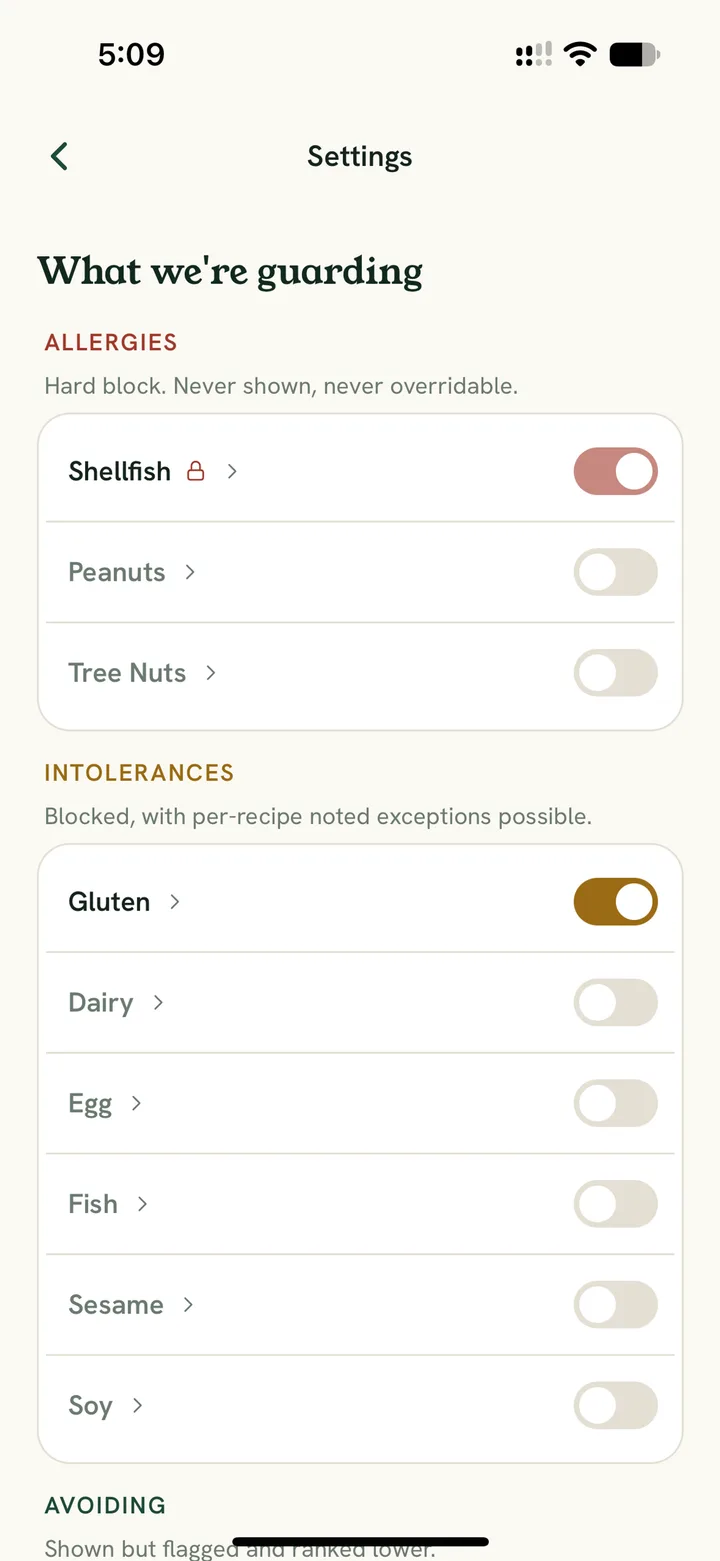
Lite is free for up to two people.
Cook Up
New dinners, built from what is already cleared
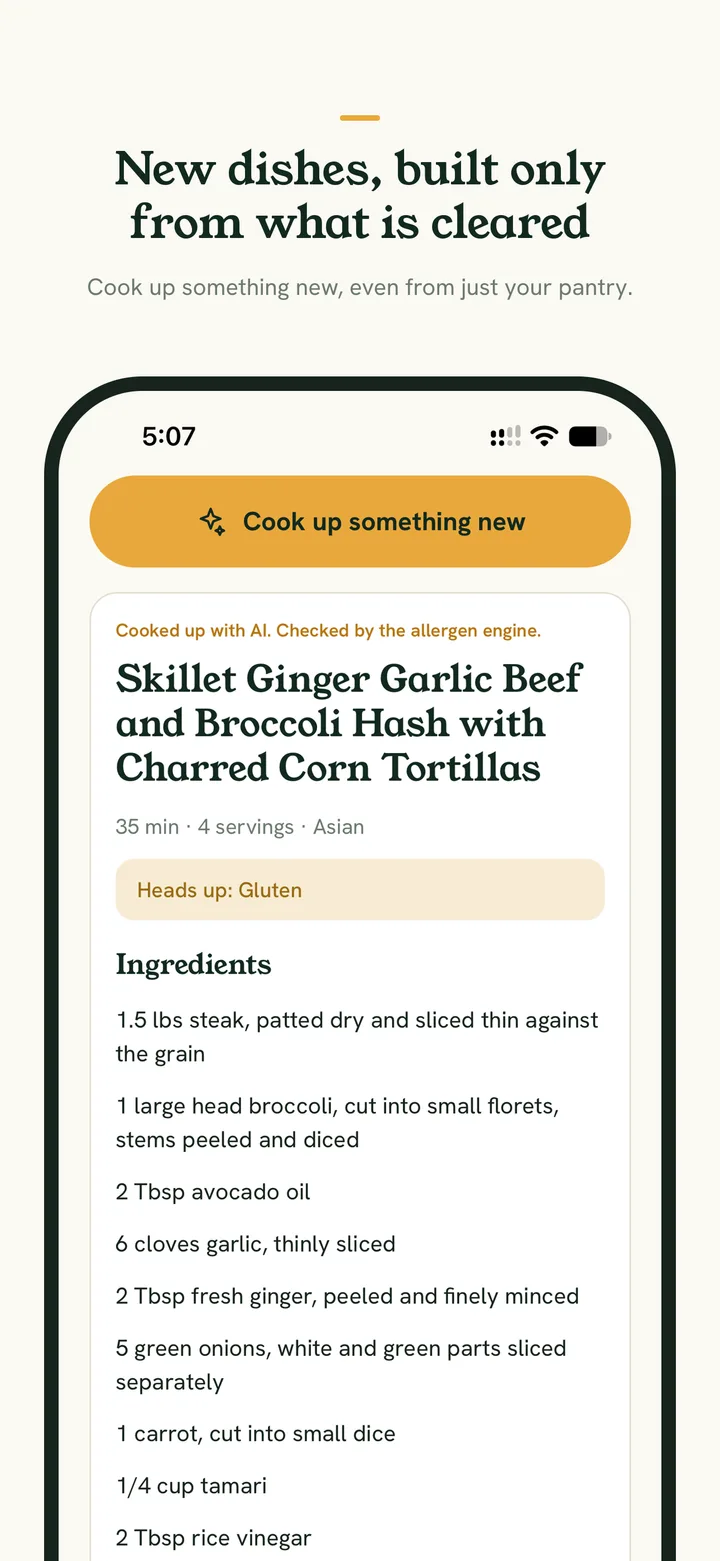
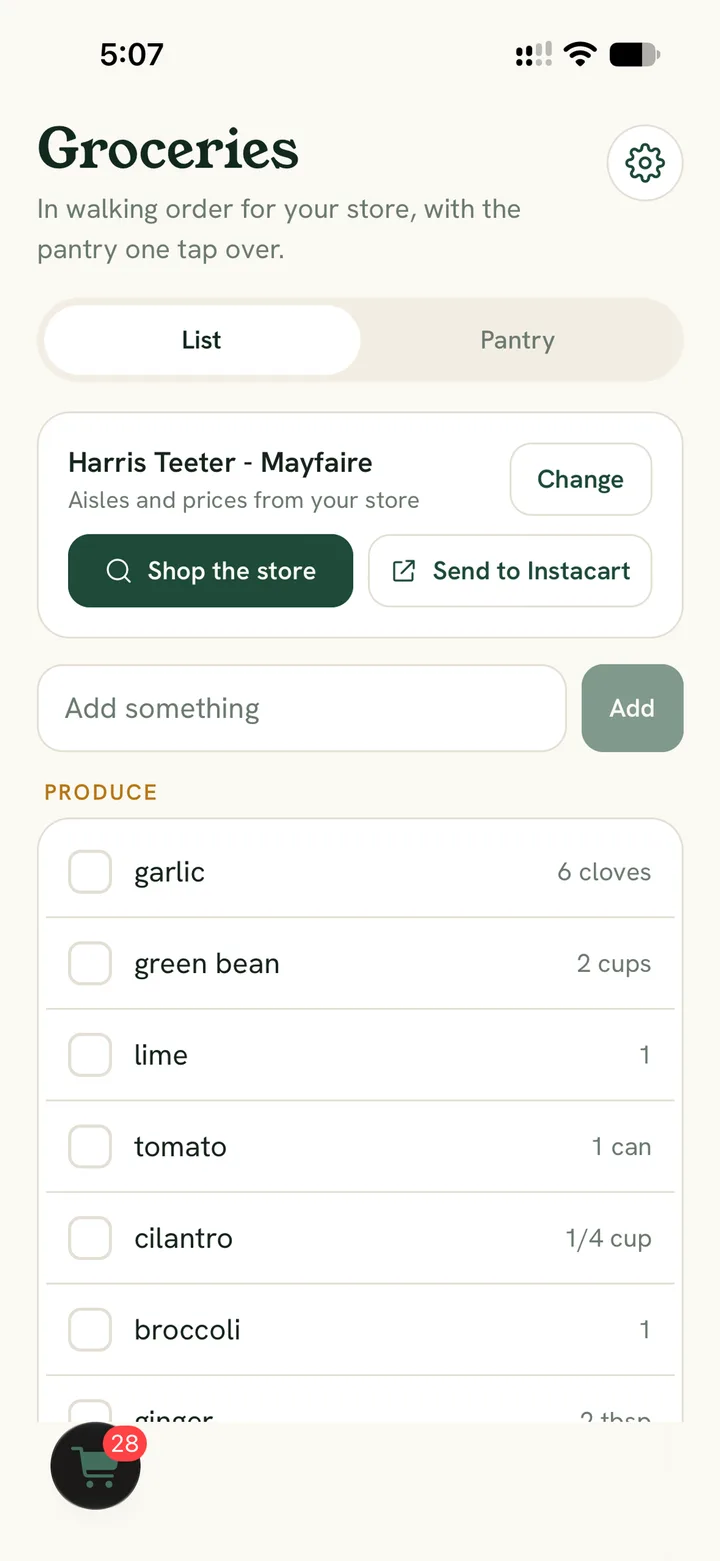
Describe the dinner you want and the generator writes an original recipe using only ingredients cleared for your table. Then the same engine that checks every other recipe checks this one, before you are allowed to save it.
- Built only from cleared ingredients, then checked again before you can save. If it fails, you never see it.
- Simple style caps the ingredient count for weeknights, and Quick and easy keeps it to about half an hour.
- From my pantry cooks with what is already in the house: pantry only, or pantry plus up to three other cleared ingredients. Salt, pepper and water are always assumed. Desserts too: baked, no bake or fruit based, written for the flours the table can have.
- One new dish a month on Lite. Forty a month on Full.
Groceries and Shop
A list in the order you walk the store
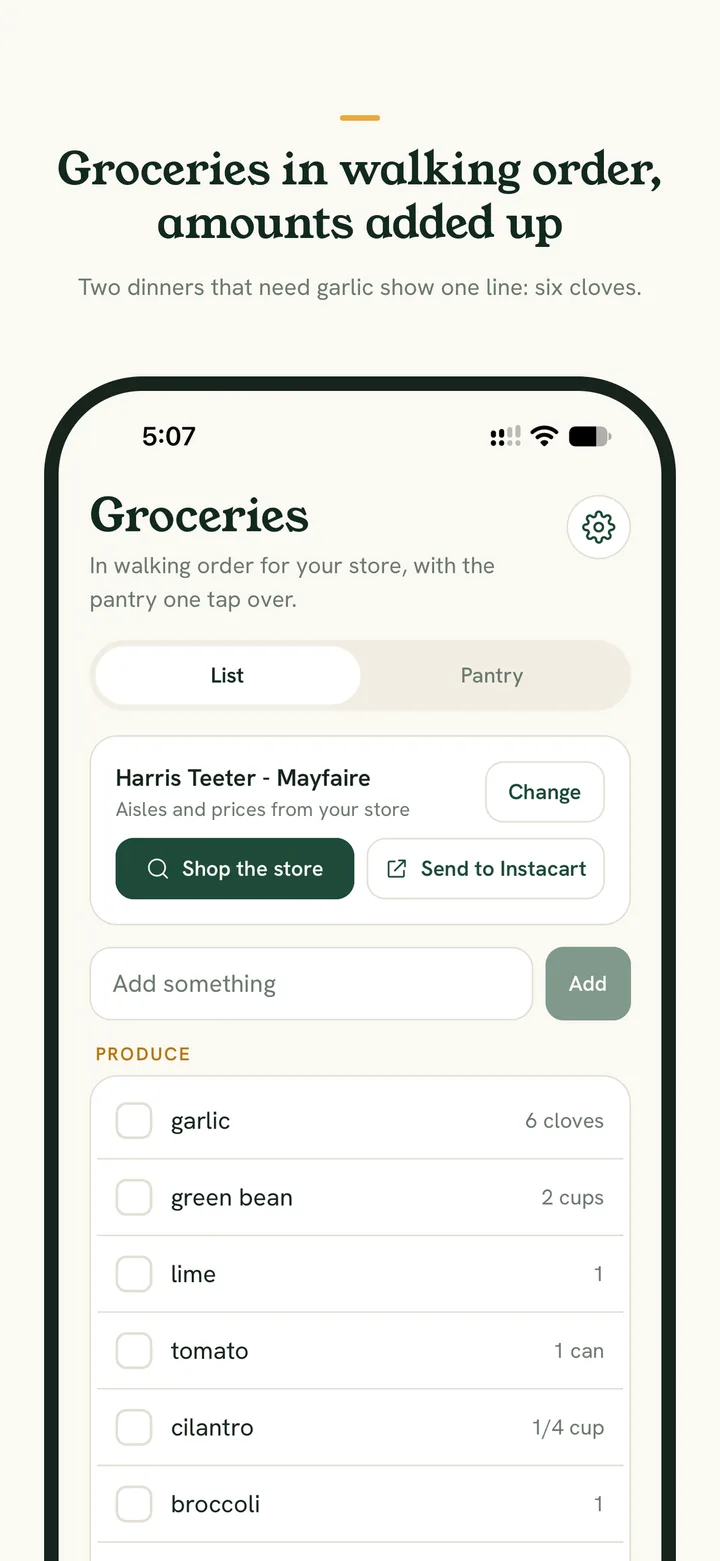
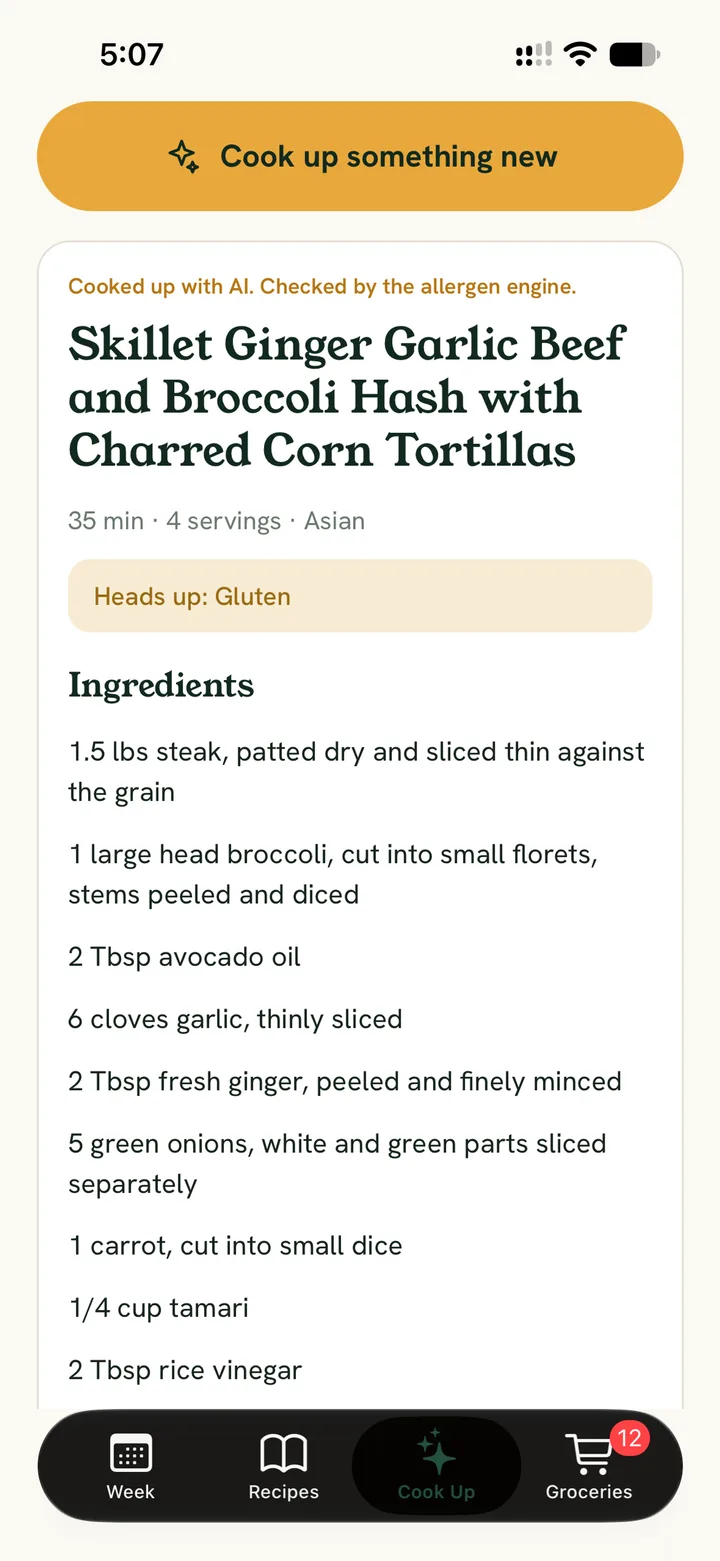
Send the week's missing ingredients to Groceries in one tap. The list groups itself by aisle, with product picks, shelf prices and a running estimated total, so the trip is a straight line instead of a scavenger hunt. The pantry is one tap over.
- Real Harris Teeter aisle order and prices, with an estimated total that updates as you shop. Store data comes from Kroger; Cleared Table is not affiliated with Kroger or Harris Teeter.
- Every item carries how much the week needs, added up across recipes: two dinners that both call for garlic show one line, six cloves.
- Checked items move to the cart, so the list above you is only what is still on the shelf. Every store works as a checklist today, and the list can be sent to Instacart.
Scan
Check the label before it goes in the cart
Point the camera at a barcode and the ingredient list is read against your table's restrictions on the spot, in the store or at home. Full tables also see the nutrition facts and a Nutri-Score letter, with a plain words explanation of how the grade works. Scan has its own spot on the tab bar, and the magnifying glass at the top of every screen finds any cleared recipe.
- Every word on the label is checked. A product that carries one of your restrictions is marked not cleared, and anything the engine cannot read is shown so you can check the package yourself.
- Add the product to the pantry under the food it is, so the pantry remembers the brand you buy, or send it straight to the grocery list. A product that is not cleared never goes on the list.
- Nutrition facts per serving and a Nutri-Score grade from A to E, letters only, with the reason in plain words. Nutri-Score rates nutrition, never allergens: an A is not the same as cleared.
- Drinks and packaged foods alike, from the USDA's branded food database. The label is always the final word.
Scan
Scan a barcode
Brown Rice Penne
Jovial
Cleared for this table.
Ingredients as read organic brown rice flour, water
Nutrition
Nutri-Score A
Nothing much counts against it.
Per serving, 2 oz dry (56 g)
- Calories
- 210
- Total fat
- 1.5 g
- Sodium
- 0 mg
- Total carbohydrate
- 44 g
- Protein
- 5 g
How Nutri-Score works
Scan
Point the camera at a barcode: the label is read against your table, with nutrition facts and a Nutri-Score letter for Full tables.
Free to start. Full when you want more.
Lite and Full
Start free. Open the rest when you are ready.
Lite is the allergen engine, the recipe library, the pantry matcher, the barcode scanner, a hand-built week, the grocery checklist, Learn (on the website, coming to the app later) and one new Cook Up original a month, free for up to two people. Full opens the Commons, the generated week, the vote on the website, store aisles and prices, nutrition facts and Nutri-Score on scanned products, recipe clipping, custom foods to avoid, forty new dishes a month and, on the website, sharing your own recipes to the Commons.
Free
For up to 2 people. No card, no clock.
- The allergen engine, every cleared recipe and the pantry matcher
- The barcode scanner and the grocery checklist
- A week built by hand and one new Cook Up original a month
$7.99 a month
or $69.99 a yearSave 27%
- 3 days free, then billed by Apple in the iPhone app. Cancel any time in your Apple account.
- Everything in Lite, for up to 8 people
- The Commons, a generated week, the vote on the website, store aisles and prices, nutrition facts and Nutri-Score, forty new dishes a month
Coming soon to the App Store
| Feature | Lite | Full |
|---|---|---|
| Restrictions and allergen engine | Included | Included |
| Recipe library | Included | Included |
| The Commons: original dishes from other tables | Not included | Included |
| Southern Family Staples cookbook (90 recipes) | Not included | Included |
| Manual recipe entry (on the website) | Included | Included |
| Pantry that remembers the brand you buy | Included | Included |
| What can I make (on the website) | Included | Included |
| Barcode scanner: label checked against your table | Included | Included |
| Nutrition facts and Nutri-Score on scanned products | Not included | Included |
| Search any cleared recipe from any page | Included | Included |
| New Cook Up originals, per month | 1 per month | 40 per month |
| Cook up a dish from the pantry | Included | Included |
| Build a week by hand | Included | Included |
| Generate a week | Not included | Included |
| Dinner voting (on the website) | Not included | Included |
| Cooking streak and Table-tested (on the website) | Not included | Included |
| Grocery checklist with amounts added up across recipes | Included | Included |
| Store aisles, prices and Shop | Not included | Included |
| Clip recipes from a link | Not included | Included |
| Share a cleared recipe by link | Included | Included |
| Cook Up originals join the Commons | Included | Included |
| Share hand-typed originals to the Commons (on the website) | Not included | Included |
| Custom foods to avoid | Not included | Included |
| Learn (on the website, coming to the app later) | Included | Included |
| Household members | Up to 2 | Up to 8 |
Full is a subscription in the iPhone app, 3 days free first, billed by Apple.
Questions
The things people ask before they sign in
Anything else, the Terms spell out exactly what the app does and does not promise. Read the Terms.
Is this medical advice?
No. Cleared Table is an organizing tool for food decisions your household has already made with its care team. It does not diagnose, treat or advise, and it can make mistakes. Ingredient labels are always the final word.
Can it catch cross-contact?
Only what an ingredient list says. The allergen engine checks the ingredients on each recipe and flags ones that commonly carry cross-contact, but it cannot see cross-contact or ingredients a label does not disclose. Read every label, every time.
How does it decide something is cleared?
Every ingredient of every recipe is checked against each restriction your household has set. Anything the engine cannot identify is treated as not cleared, and anything that fails never appears. Cross-contact is tracked separately and shown as its own warning.
Where do the recipes come from?
Three places: Cook Up originals your table makes (an AI recipe writer drafts each one from what your table can eat, then the allergen engine checks it), the Commons, and recipes you clip from other websites. Every Cook Up original, from every table, joins the Commons with attribution the moment it is made, so the pool grows with everyone who cooks here. Clipped recipes stay private to your household and keep a link back to their source.
Does it work with my store?
Aisle order and shelf prices come from Harris Teeter today, with the rest of the Kroger family of stores next as the store picker lands. Every store works as a checklist: the list still groups itself, and checked items still move to the cart.
Can I add my family?
Yes. A household admin creates invite codes in Settings and shares one with each person. Everyone signs in with Google or Apple, joins the same table, and sees the same cleared list. Lite seats two people and Full seats eight.
Can I share a recipe with someone outside my table?
Yes. Any cleared recipe can be shared as a link, with a story card for the share sheet. The page shows the dish, its ingredients and what it is free of, and nothing about your household. Stop sharing at any time and the link closes.
What does Full cost?
Full is a subscription in the Cleared Table iPhone app: 3 days free, then $7.99 a month or $69.99 a year, billed by Apple and cancelled any time in your Apple account. Lite is free for up to 2 people and Full seats 8.
Is it a real app?
Yes. The Cleared Table app for iPhone is in its last round of testing and coming soon to the App Store. The website is also an installable web app: add it to your home screen and it opens full-screen from its own icon, signed in and ready. Here is how to put it on your phone.
How do I get help?
Email info@clearedtable.com. A question, a verdict that looks wrong, something broken: we read every message, and a wrong verdict gets looked at first.
Lite is free
Set your table once. Every dinner after that is already checked.
Sign in with Google or Apple, set your household's restrictions, and the recipe library, pantry matcher and week planner are yours. Full opens with a 3 day free trial in the iPhone app.